
You’ve got the court booked and eight people who said “gas”. FOM Play gives the host one place to set the session up, record scores, and close the night. The host needs to sign in; the rest of the lineup can be registered FOM players or guests entered by name.
1. Create the match
Open the FOM Play web app, sign in, and start a match. Give the session a useful name — “Friday Night Americano” works fine. The name is used again in match history, shared views, and any FOM Rewind you create after finalizing the session.
2. Pick a format
FOM supports three formats:
- Americano — configured rounds are prepared up front, with the scheduler prioritizing even play counts and partner/opponent variety.
- Mexicano — the next round is built from the current standings, placing players or fixed teams with similar results into the same court group.
- Match Play — tennis-style game scoring, with Race or Best of match modes.
Format and partner mode are separate choices. Choose Rotating for changing partners and individual standings, or Fix Partner to keep pairs together and rank the session by team. Americano with Rotating partners is a straightforward first setup for a social group, but it is not the only valid combination.
3. Add your players
Add FOM friends, search for registered players, reuse saved players, or enter a guest by name. A guest can appear in the schedule and the match-night standings without creating an account. Persistent MMR and profile history only apply to eligible registered players.
4. Set courts and points
Set the number of courts and rounds. Americano and Mexicano also use a target total of points per game; the current setup starts at 21 and can be adjusted. Match Play instead uses tennis-style scoring, where you choose a games target or Best of sets plus Golden Point or Advantage at deuce.
5. Generate and play
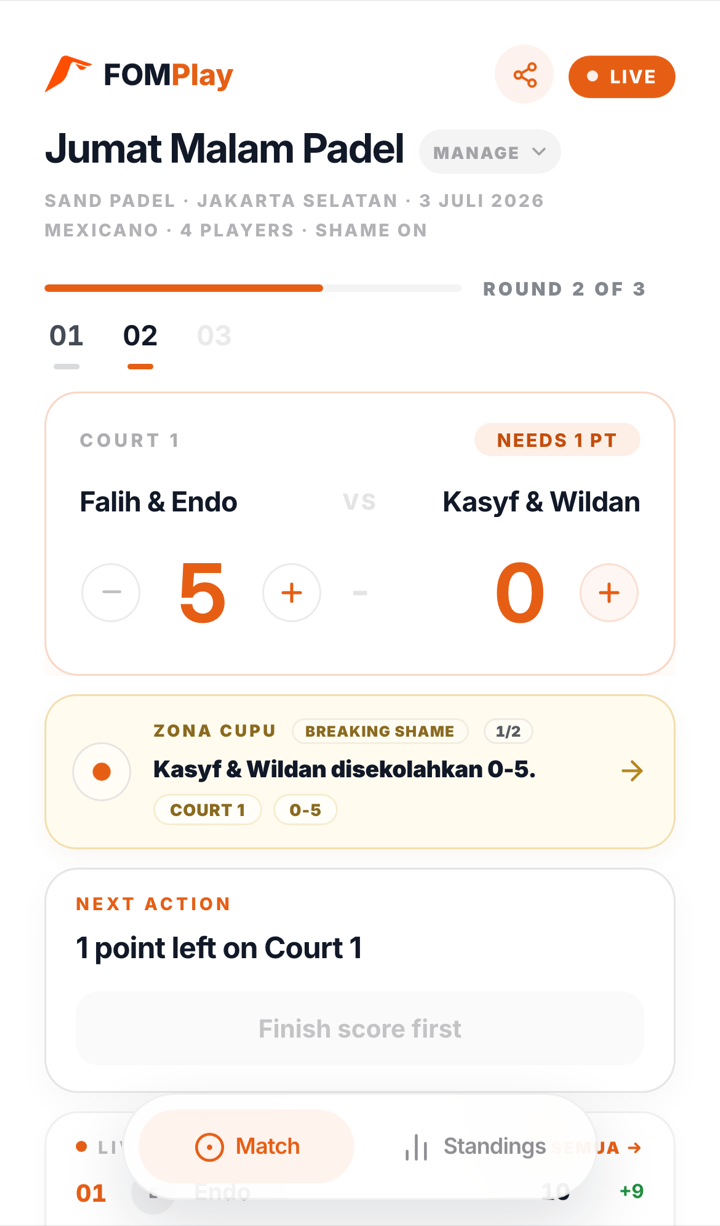
Review the setup and tap Generate Match. Americano prepares its configured rounds; Mexicano and Match Play start with the opening round and build later rounds as the session progresses. Enter scores from the host screen and FOM recalculates the local standings from the recorded results.
That’s genuinely it
Create a read-only link if the group wants to follow from their browsers. That shared snapshot updates at match milestones — for example when a round starts or completes, when Match Play crosses a game/set boundary or completes, and when saved-score corrections sync — rather than promising a remote refresh for every tap.
When the final round is complete, finish the match so FOM can save history and ask the backend to process eligible registered-player stats and MMR. The Rewind prompt then lets you turn the finalized result into a recap. That is the full host loop, with the important sync steps made visible instead of hidden behind a claim of “zero admin.”